> ## Documentation Index
> Fetch the complete documentation index at: https://docs.useagentshop.com/llms.txt
> Use this file to discover all available pages before exploring further.
# Growth Opportunities: Review and Approve AI Drafts
> agentShop watches for four types of openings, drafts responses, and queues them for your review. Nothing goes out without your approval.
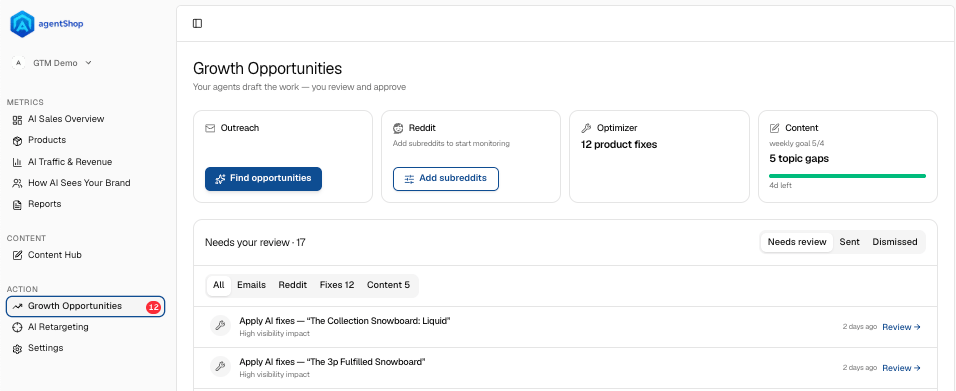
**What Growth Opportunities is:** This is where your agents draft the work and you review and approve. agentShop watches for four kinds of opening — outreach, Reddit conversations, product fixes, and content gaps — drafts the response for each, and drops it into one review queue. Nothing goes out on its own: you approve every item. Open **Growth Opportunities** from the left menu under **Action**.
 ## The four opportunity types (top cards)
**Outreach.** Finds articles that AI already cites, drafts an email to the author pitching your product for inclusion, and stacks the drafts up for your review. **Run again** kicks off a fresh scan.
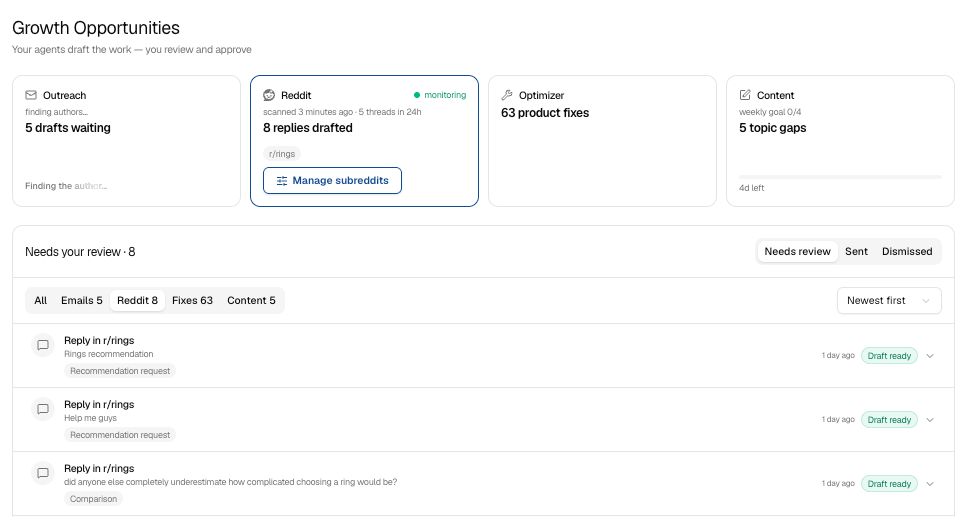
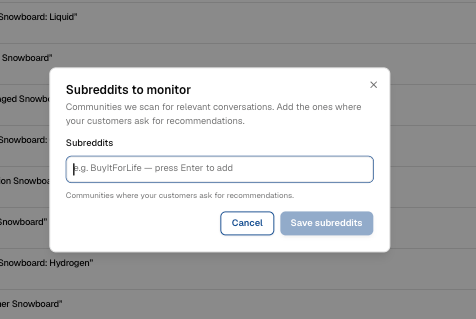
**Reddit.** Monitors the subreddits where your customers ask for recommendations and drafts a reply for each relevant thread. Use **Manage subreddits** to set which communities it watches.
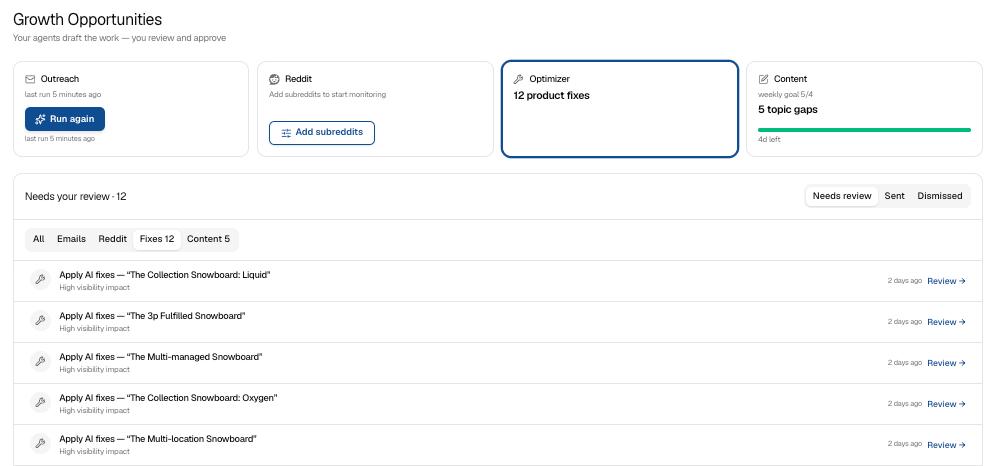
**Optimizer.** Surfaces product-page fixes that make AI more likely to recommend a product. Reviewing these takes you into the **product-page (PDP) optimization** flow.
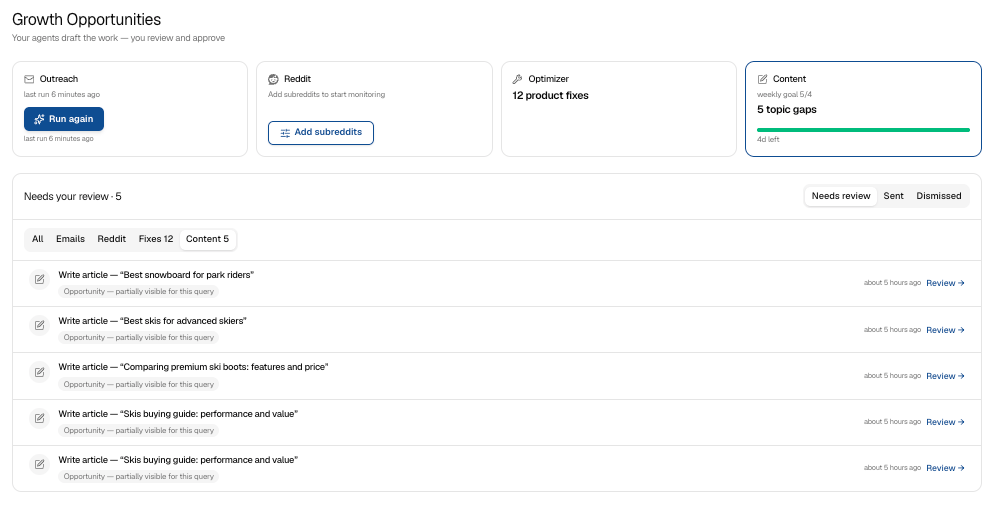
**Content.** Flags shopping topics where you're invisible and worth writing about, against a weekly goal. Reviewing these takes you into the **Content Hub** to generate the article.
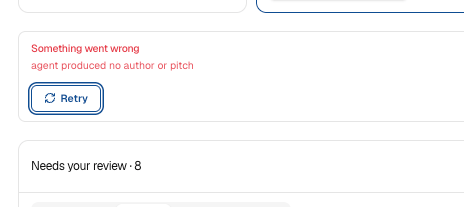
*If a card shows "Something went wrong" (for example, "agent produced no author or pitch"), just hit **Retry** — the agent will re-draft that item.*
## The four opportunity types (top cards)
**Outreach.** Finds articles that AI already cites, drafts an email to the author pitching your product for inclusion, and stacks the drafts up for your review. **Run again** kicks off a fresh scan.
**Reddit.** Monitors the subreddits where your customers ask for recommendations and drafts a reply for each relevant thread. Use **Manage subreddits** to set which communities it watches.
**Optimizer.** Surfaces product-page fixes that make AI more likely to recommend a product. Reviewing these takes you into the **product-page (PDP) optimization** flow.
**Content.** Flags shopping topics where you're invisible and worth writing about, against a weekly goal. Reviewing these takes you into the **Content Hub** to generate the article.
*If a card shows "Something went wrong" (for example, "agent produced no author or pitch"), just hit **Retry** — the agent will re-draft that item.*
 ***
## The review queue
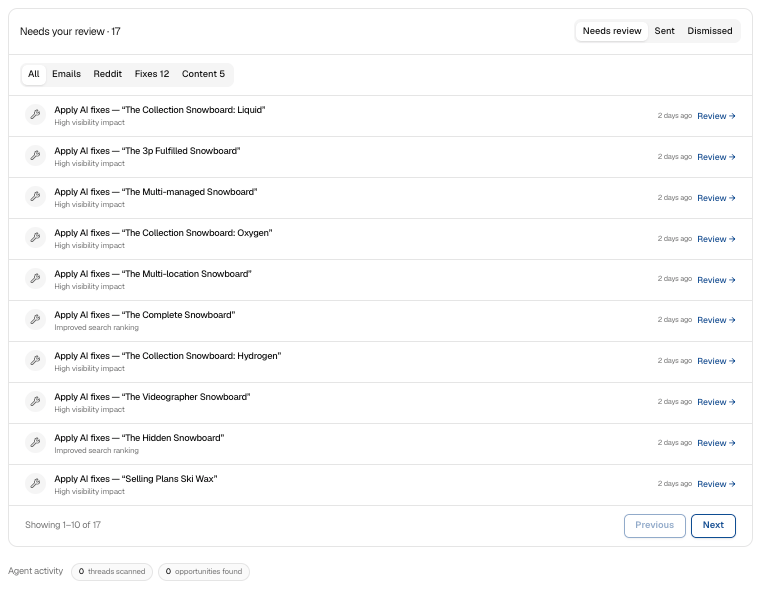
Everything the agents draft lands under **Needs your review**. Filter by type with the tabs — **All, Emails, Reddit, Fixes, Content** — and switch between **Needs review**, **Sent**, and **Dismissed** to see where things stand. Sort by newest or most relevant.
***
## The review queue
Everything the agents draft lands under **Needs your review**. Filter by type with the tabs — **All, Emails, Reddit, Fixes, Content** — and switch between **Needs review**, **Sent**, and **Dismissed** to see where things stand. Sort by newest or most relevant.
 Here's how each type works:
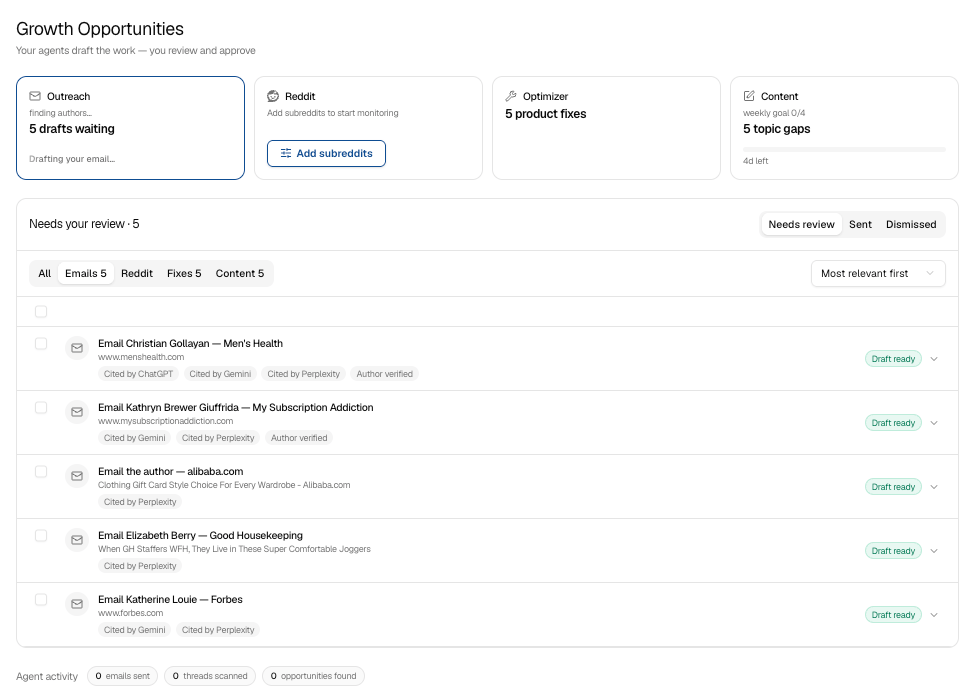
**Reviewing an Outreach email.** Each item shows **the article** (and which AI cited it — ChatGPT, Gemini, Perplexity), **the author** and whether they're verified, **why this matters**, and the **draft email**. Read it, **Edit** or **Copy** if needed, then **Send via AgentShop** (sends from your outreach address, replies route to your inbox) or **Open in mail app** to send yourself. **Mark as sent** or **Dismiss** to clear it. There's also a **follow-up draft** in a different angle if the first doesn't land. Check every claim before sending — real products, real specs only.
Here's how each type works:
**Reviewing an Outreach email.** Each item shows **the article** (and which AI cited it — ChatGPT, Gemini, Perplexity), **the author** and whether they're verified, **why this matters**, and the **draft email**. Read it, **Edit** or **Copy** if needed, then **Send via AgentShop** (sends from your outreach address, replies route to your inbox) or **Open in mail app** to send yourself. **Mark as sent** or **Dismiss** to clear it. There's also a **follow-up draft** in a different angle if the first doesn't land. Check every claim before sending — real products, real specs only.
 **Reviewing a Reddit reply.** Each item shows **what they asked** (the actual thread), **why we surfaced this**, and the **drafted reply**. Before you post, read the **Safety checklist** — the reply must disclose that you're affiliated with the store; that disclosure is required, not optional. The draft also confirms it has **no links** and mentions the store just once. When it's right, **Copy & open on Reddit** (it copies your reply and opens the thread — paste, post, then come back and **Mark as replied**). **Regenerate** for a fresh draft, or **Dismiss**.
 **Reviewing a Fix.** Each item is an **Apply AI fixes** task for one product, tagged by expected effect (*High visibility impact*, *Improved search ranking*). Click **Review** to open it in the product-page optimization flow, where you approve the change.
 **Reviewing a Content gap.** Each item is a **Write article** task for a topic you're missing, tagged *Opportunity* (partially visible) or *Gap to win* (AI never cites you). Click **Review** to open it in the Content Hub and generate the article.
 ***
## Manage subreddits
From the Reddit card, **Manage subreddits** opens the list of communities agentShop scans — the places your customers ask for recommendations. Add or remove subreddits, then **Save subreddits**. Choose communities where buyers actually ask for advice; that's where the useful threads come from.
***
## Manage subreddits
From the Reddit card, **Manage subreddits** opens the list of communities agentShop scans — the places your customers ask for recommendations. Add or remove subreddits, then **Save subreddits**. Choose communities where buyers actually ask for advice; that's where the useful threads come from.
 ***
## Store setup and agent activity
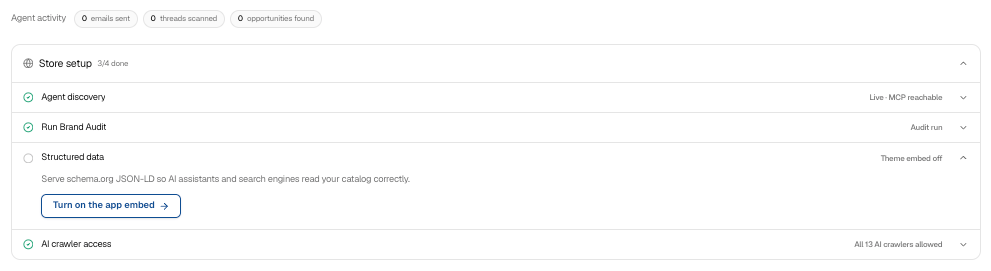
At the bottom, **Store setup** tracks the foundations that make all of this work: **Agent discovery** (whether AI can read your `/agents.md` and `/llms.txt`), **Run Brand Audit**, **Structured data**, and **AI crawler access**. Work through anything not yet green — if Agent discovery shows *Not responding*, a theme template or domain proxy is likely overriding it; click **Review** to fix. The **Agent activity** strip shows what the agents have been doing — threads scanned, opportunities found, emails sent, and the last scan time.
***
## Store setup and agent activity
At the bottom, **Store setup** tracks the foundations that make all of this work: **Agent discovery** (whether AI can read your `/agents.md` and `/llms.txt`), **Run Brand Audit**, **Structured data**, and **AI crawler access**. Work through anything not yet green — if Agent discovery shows *Not responding*, a theme template or domain proxy is likely overriding it; click **Review** to fix. The **Agent activity** strip shows what the agents have been doing — threads scanned, opportunities found, emails sent, and the last scan time.
 ## Related topics
- [Workflows: What You Do in agentShop, Step by Step](/user-guide/workflows/overview.md)
- [Quick Start: Connect Shopify and Run Your First Brand Audit](/user-guide/quickstart.md)
- [Create Content That AI Shopping Assistants Can Cite](/user-guide/workflows/content-hub.md)
- [agentShop AI Sales Overview: Your Revenue Command Center](/user-guide/screens/ai-sales-overview.md)
- [Screen Reference: Every agentShop Screen at a Glance](/user-guide/screens/overview.md)
## Related topics
- [Workflows: What You Do in agentShop, Step by Step](/user-guide/workflows/overview.md)
- [Quick Start: Connect Shopify and Run Your First Brand Audit](/user-guide/quickstart.md)
- [Create Content That AI Shopping Assistants Can Cite](/user-guide/workflows/content-hub.md)
- [agentShop AI Sales Overview: Your Revenue Command Center](/user-guide/screens/ai-sales-overview.md)
- [Screen Reference: Every agentShop Screen at a Glance](/user-guide/screens/overview.md)