> ## Documentation Index
> Fetch the complete documentation index at: https://docs.useagentshop.com/llms.txt
> Use this file to discover all available pages before exploring further.
# Create Content That AI Shopping Assistants Can Cite
> Write articles that give AI shopping assistants a source to cite when recommending products in your category, and review them before they publish.
**What Content Hub does:** Content Hub is where you create content that helps AI recommend your products. The idea is simple: when AI overlooks you for a shopping topic, an article that answers that topic's buyer questions — and features the right product — gives AI something to cite. This is the "get chosen" play in article form, aimed straight at the topics where you're currently invisible.
**1. Open Content Hub.** From the left menu, under **Content**, click **Content Hub**. You'll land on your article list — everything you've created, with its status, word count, and date.
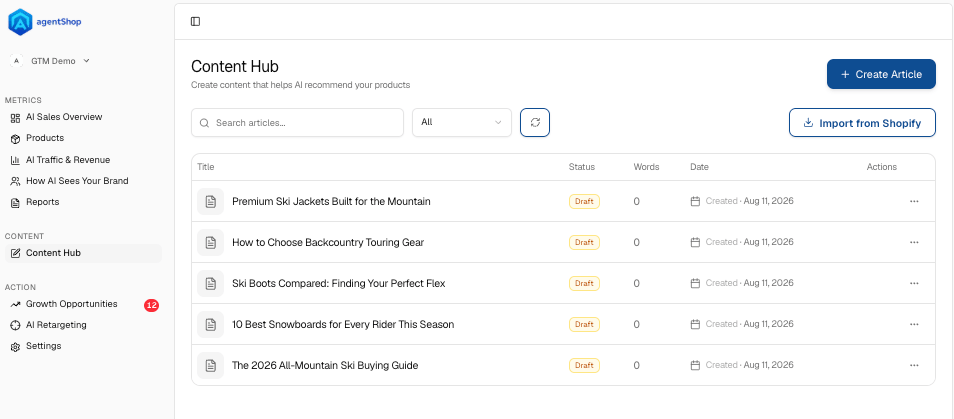 **2. Scan your existing articles.** Each article shows a **Status** — *Draft* or *Needs review* — plus **Words** and the date it was created. Use search and the filter to find one, or the **⋯** menu on any row to open, edit, or manage it. *Needs review* means it's written but not signed off yet.
**3. (Optional) Import from Shopify.** Already have blog content? Click **Import from Shopify** to pull it in instead of starting from scratch — useful when you want to optimize existing posts rather than write new ones.
**4. Start a new article.** Click **Create Article** in the top right to open the generator.
**5. Pick a topic to write about.** Under *What should this article be about?*, choose a shopping topic you track. The article will answer that topic's buyer questions and feature its product. Search for a topic, or pick from the suggested list.
**2. Scan your existing articles.** Each article shows a **Status** — *Draft* or *Needs review* — plus **Words** and the date it was created. Use search and the filter to find one, or the **⋯** menu on any row to open, edit, or manage it. *Needs review* means it's written but not signed off yet.
**3. (Optional) Import from Shopify.** Already have blog content? Click **Import from Shopify** to pull it in instead of starting from scratch — useful when you want to optimize existing posts rather than write new ones.
**4. Start a new article.** Click **Create Article** in the top right to open the generator.
**5. Pick a topic to write about.** Under *What should this article be about?*, choose a shopping topic you track. The article will answer that topic's buyer questions and feature its product. Search for a topic, or pick from the suggested list.
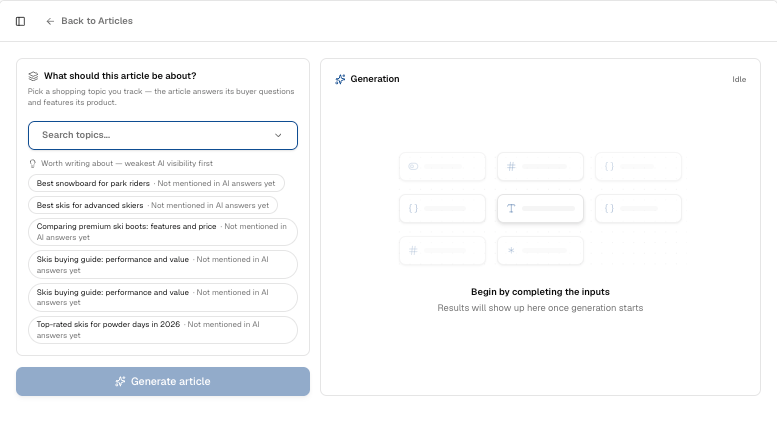 **6. Go after your weakest visibility first.** The suggestions are sorted **weakest AI visibility first**, and topics flagged *"Not mentioned in AI answers yet"* are your biggest gaps — the questions shoppers ask where AI never brings you up. Writing for those is where a single article moves the needle most.
**7. Generate the article.** Click **Generate article**. The draft builds in the **Generation** panel on the right — it stays idle until you've picked a topic, then fills in as it writes.
**8. Review before it ships.** New articles land as a **Draft** or **Needs review** — that's your cue, not your finish line. To open one, use the row's **⋯ menu → Edit** (the row menu only offers Edit and Delete). Read it, check the facts and product claims, and edit in your voice before anything goes live. Nothing publishes without a human sign-off.
**6. Go after your weakest visibility first.** The suggestions are sorted **weakest AI visibility first**, and topics flagged *"Not mentioned in AI answers yet"* are your biggest gaps — the questions shoppers ask where AI never brings you up. Writing for those is where a single article moves the needle most.
**7. Generate the article.** Click **Generate article**. The draft builds in the **Generation** panel on the right — it stays idle until you've picked a topic, then fills in as it writes.
**8. Review before it ships.** New articles land as a **Draft** or **Needs review** — that's your cue, not your finish line. To open one, use the row's **⋯ menu → Edit** (the row menu only offers Edit and Delete). Read it, check the facts and product claims, and edit in your voice before anything goes live. Nothing publishes without a human sign-off.
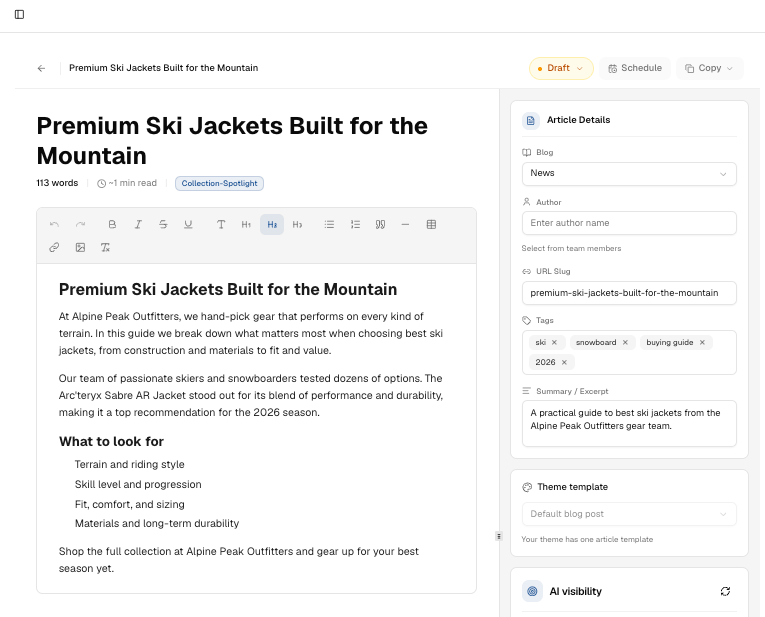 **9. Publish to your store.** Publishing happens inside the article editor, not the list. In the editor: set the **Blog** it should post to and the **Theme template**; the **URL slug is generated by Shopify on publish**. The controls are top-right — a **status** control (Draft → Pending Review → Published) and a **Schedule** button if you want to publish later. Once the article is live on your Shopify blog, agentShop starts tracking whether AI assistants cite it.
## Related topics
- [What Is AEO? Answer Engine Optimization for DTC Brands](/user-guide/concepts/what-is-aeo.md)
- [Workflows: What You Do in agentShop, Step by Step](/user-guide/workflows/overview.md)
- [agentShop User Guide: Get Chosen by AI Assistants](/user-guide/introduction.md)
- [Growth Opportunities: Review and Approve AI Drafts](/user-guide/workflows/growth-opportunities.md)
- [How to Optimize a Product Page for AI Recommendations](/user-guide/workflows/optimize-product-page.md)
**9. Publish to your store.** Publishing happens inside the article editor, not the list. In the editor: set the **Blog** it should post to and the **Theme template**; the **URL slug is generated by Shopify on publish**. The controls are top-right — a **status** control (Draft → Pending Review → Published) and a **Schedule** button if you want to publish later. Once the article is live on your Shopify blog, agentShop starts tracking whether AI assistants cite it.
## Related topics
- [What Is AEO? Answer Engine Optimization for DTC Brands](/user-guide/concepts/what-is-aeo.md)
- [Workflows: What You Do in agentShop, Step by Step](/user-guide/workflows/overview.md)
- [agentShop User Guide: Get Chosen by AI Assistants](/user-guide/introduction.md)
- [Growth Opportunities: Review and Approve AI Drafts](/user-guide/workflows/growth-opportunities.md)
- [How to Optimize a Product Page for AI Recommendations](/user-guide/workflows/optimize-product-page.md)