> ## Documentation Index
> Fetch the complete documentation index at: https://docs.useagentshop.com/llms.txt
> Use this file to discover all available pages before exploring further.
# Reports: Pre-Built Analytics for AI Commerce Performance
> Browse, run, and revisit pre-built reports that answer specific questions about AI revenue, visibility, search performance, and funnel health.
The **Reports** page is the library where the AI shopping data gets organized into ready-made views — each one answering a specific question about how AI assistants drive your traffic, conversion, and revenue. Rather than one giant dashboard, it's a shelf of focused reports you open as needed.
**Two tabs sit at the top.** **New reports** is the catalog of everything available; **Report history** is where the ones you've already run are saved, so you can return to a past view without rebuilding it.
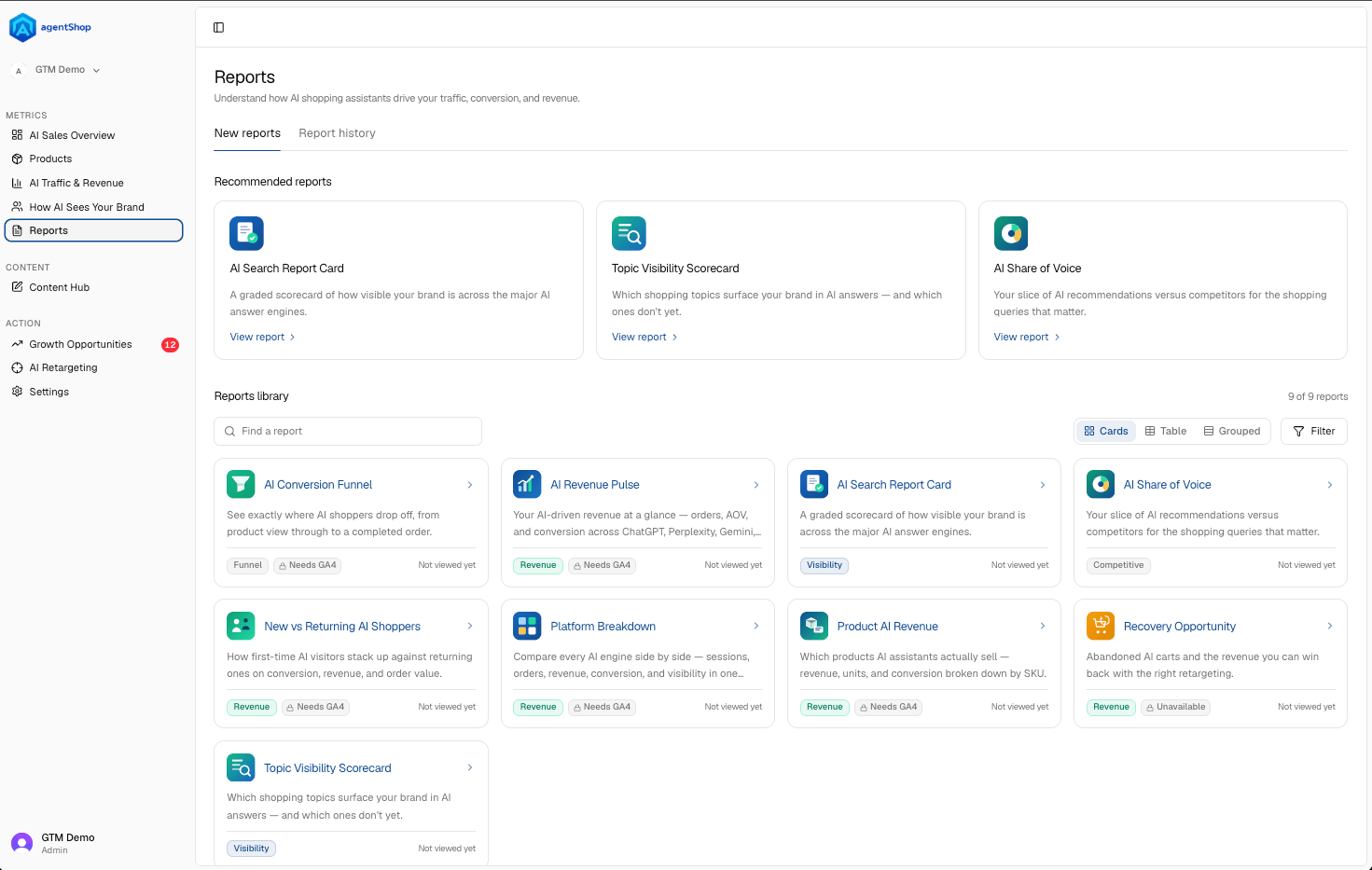 **The page is organized into three bands** so you don't have to hunt:
* **Recently used** surfaces the reports you opened last — your quickest path back to whatever you were just looking at.
* **Recommended reports** highlights a few worth checking regularly (things like AI Revenue Pulse, Platform Breakdown, and the AI Search Report Card).
* **Reports library** is the full set — nine in total — each shown as a card with a one-line description, a **category tag** (Revenue, Visibility, Competitive, Funnel), and when you last viewed it.
**The category tags are the fastest way to navigate by intent.** Chasing money questions? Look at **Revenue**. Worried about whether AI mentions you? **Visibility**. Sizing up rivals? **Competitive**. Diagnosing drop-off? **Funnel**. A report can also show an **Unavailable** flag when its data source isn't connected yet — that's your cue to finish a setup step before it'll populate.
**The controls on the library** let you find things fast: a **Find a report** search box, a **Filter**, and three view modes — **Cards** (visual, description-forward), **Table** (dense, scannable), and **Grouped** (clustered by category). Pick whichever matches how you think; the underlying reports are the same.
The practical way to use this page: start from **Recommended** or **Recently used** for your routine checks, and dip into the **library** — filtered by the category tag that matches your question — when you need a specific answer. Then open the report itself, where the date-range and source filters let you slice it further. For a breakdown of each individual report, see the **Reports** section of this guide.
## Related topics
- [Screen Reference: Every agentShop Screen at a Glance](/user-guide/screens/overview.md)
- [agentShop User Guide: Get Chosen by AI Assistants](/user-guide/introduction.md)
- [Reports Reference: Every agentShop Report Explained](/user-guide/reports/reference.md)
- [Storefront analytics](/sdk/analytics.md)
- [agentShop Glossary: Key AI Commerce Terms Explained](/user-guide/glossary.md)
**The page is organized into three bands** so you don't have to hunt:
* **Recently used** surfaces the reports you opened last — your quickest path back to whatever you were just looking at.
* **Recommended reports** highlights a few worth checking regularly (things like AI Revenue Pulse, Platform Breakdown, and the AI Search Report Card).
* **Reports library** is the full set — nine in total — each shown as a card with a one-line description, a **category tag** (Revenue, Visibility, Competitive, Funnel), and when you last viewed it.
**The category tags are the fastest way to navigate by intent.** Chasing money questions? Look at **Revenue**. Worried about whether AI mentions you? **Visibility**. Sizing up rivals? **Competitive**. Diagnosing drop-off? **Funnel**. A report can also show an **Unavailable** flag when its data source isn't connected yet — that's your cue to finish a setup step before it'll populate.
**The controls on the library** let you find things fast: a **Find a report** search box, a **Filter**, and three view modes — **Cards** (visual, description-forward), **Table** (dense, scannable), and **Grouped** (clustered by category). Pick whichever matches how you think; the underlying reports are the same.
The practical way to use this page: start from **Recommended** or **Recently used** for your routine checks, and dip into the **library** — filtered by the category tag that matches your question — when you need a specific answer. Then open the report itself, where the date-range and source filters let you slice it further. For a breakdown of each individual report, see the **Reports** section of this guide.
## Related topics
- [Screen Reference: Every agentShop Screen at a Glance](/user-guide/screens/overview.md)
- [agentShop User Guide: Get Chosen by AI Assistants](/user-guide/introduction.md)
- [Reports Reference: Every agentShop Report Explained](/user-guide/reports/reference.md)
- [Storefront analytics](/sdk/analytics.md)
- [agentShop Glossary: Key AI Commerce Terms Explained](/user-guide/glossary.md)